Why are people switching from NocoDB to Visual DB?
Visual DB is compared below with NocoDB, a self-hostable no-code database platform.
NocoDB is a spreadsheet-database hybrid that lets users manage data in a familiar grid view, built directly on top of SQL databases. However, NocoDB is weak in data integrity: it takes a spreadsheet approach to collaboration—spreadsheets don't have a concept of record-level consistency and neither does NocoDB. If multiple people edit different parts of the same record at the same time, their changes sync instantly, but that means the changes can mix and the resulting record is a combination neither person individually reviewed or approved. If you chose to store data in a relational database for its data integrity benefits, you should know that NocoDB's approach downgrades it back to a spreadsheet. See below for further details.
Worth knowing upfront: NocoDB dropped its AGPL-3.0 open-source license in early 2026 for a proprietary license. The project has pulled "open source" language from its repo and docs. If you picked NocoDB for its open-source license, that reason no longer applies to current releases. License aside, the free self-hosted edition still ships with core pieces locked behind Enterprise.
Visual DB takes a database-first approach—it prioritizes data integrity and doesn't make you choose between "free and limited" or "full-featured and locked to our cloud." Self-host it and you get the same features as the cloud version.
See how Visual DB compares across key features and capabilities
| Visual DB | NocoDB | ||
|---|---|---|---|
| Sheets | |||
| Overwrite prevention 1 | |||
| Record-level consistency 2 | |||
| Visual conflict resolution 3 | |||
| Custom field validation with inline errors 4 | |||
| Field-level conditional coloring 5 | |||
| Shared, personal and locked views | |||
| Find and highlight as you type 6 | |||
| Review changes before committing 7 | |||
| Revert unwanted changes before committing 8 | |||
| Control who sees what records 9 | |||
| Parameterized filtering with a top-of-sheet dropdown | |||
| Fully formatted offline-viewable snapshot (HTML) 9 | |||
| Forms | |||
| Create new record | |||
| Pull up specific records 10 | |||
| Update records from a form | |||
| Delete records from a form | |||
| Automatic form layout using AI | |||
| Arrange multiple fields per row 11 | |||
| Freely resize fields 11 | |||
| Smart guides (for rearranging and resizing fields) 12 | |||
| Master-detail forms 13 | |||
| Custom field validation | |||
| Control who sees what records 9 | |||
| Reports & dashboards | |||
| Query builder 14 | |||
| AI assistance for query building 15 | |||
| Query parameters (multi-value, cascading) 16 | |||
| Charts with static series 17 | |||
| Charts with dynamic series 17 | |||
| Interactive time-series (zoom / pan) 18 | |||
| Database | |||
| Take instant ownership of your managed database 19 | |||
| AI assistance for writing raw SQL commands | |||
| Self-hosting & limits | |||
| Self-hosted edition has every feature of the cloud edition 20 | |||
| Single sign-on (SSO), even self-hosted 21 | |||
| No artificial record / API / webhook caps 22 | |||
| Pricing | |||
| Pricing for 10 users — cloud | $50 per month | $216 per month | |
| Pricing for 10 users — self-hosted | $50 per month | $240 per month | |
The collaboration challenge
NocoDB is built on a shaky foundation
NocoDB stores data in real databases such as Postgres, so it's tempting to assume you automatically get real database guarantees. You don't. Storing data in a database won't automatically solve collaboration problems—databases facilitate proper collaboration, they don't enforce it.
Like most spreadsheet-style front-ends, NocoDB updates records field-by-field rather than as a single atomic write, and it doesn't detect when two people edit the same record at once. That opens the door to two specific failure modes:
- Overwrites: if two people edit the same field at the same time, one edit silently wins and the other disappears—no warning, no diff, no visual merge.
- Record-level inconsistency: if two people edit different fields on the same record at the same time, the row can end up holding a combination neither person ever intended—two individually correct edits that together produce an incorrect record.
Consider a medication table where one user updates a patient's pill strength while another changes the dosage frequency. Without atomic updates, you could end up with an unintended combination that neither user asked for.
Visual DB does it the way a database is supposed to
In relational databases, the record (row) is a logical unit of consistency—a record is supposed to go from one consistent version to another consistent version, in one atomic step. Visual DB follows that rule: we update the record atomically so your changes can't mix with someone else's, and we prevent overwriting other users' changes in the first place.
When evaluating any tool that sits on top of a database, ask: does this deliver the data integrity benefits of a real database, or just the complexity of one?
Visual conflict resolution
Modern database systems prevent overwrites using atomic updates and transactions—core ACID properties that guarantee data integrity during concurrent edits.
Visual DB fully leverages these safeguards. When a conflict does occur, Visual DB offers a visual record merge interface that shows conflicting values side-by-side and lets the user decide which versions to keep. Resolving a conflict is a deliberate choice, never a coin flip.
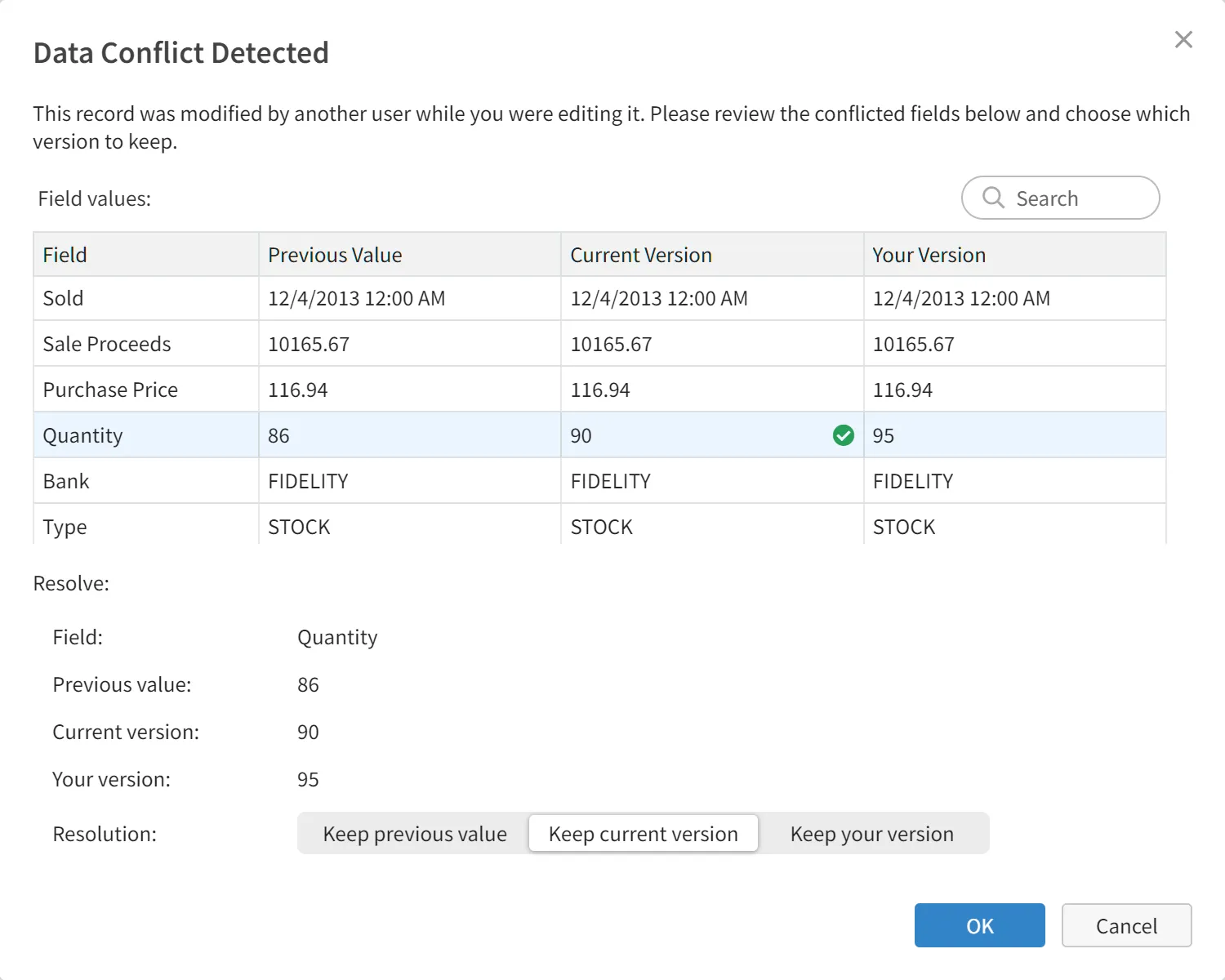
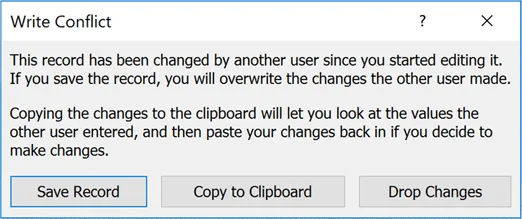
NocoDB doesn't support conflict detection, let alone conflict resolution. It's worth noting that even Microsoft Access—while not designed as a true multi-user database system and not known for its strong data integrity features—still offers basic conflict detection.
You'd never accept a version control system where users constantly overwrite each other's changes. Why accept a database tool that does exactly that?
Garbage in, garbage out
A database is only as good as the data you put in
Visual DB stops bad data at the source with comprehensive field validation. Set minimum and maximum values for numeric fields, validate email addresses and phone numbers, enforce SSN formats, and more. Invalid data gets a red squiggly underline with a click-to-view error message, and the record simply won't save until every error is fixed.
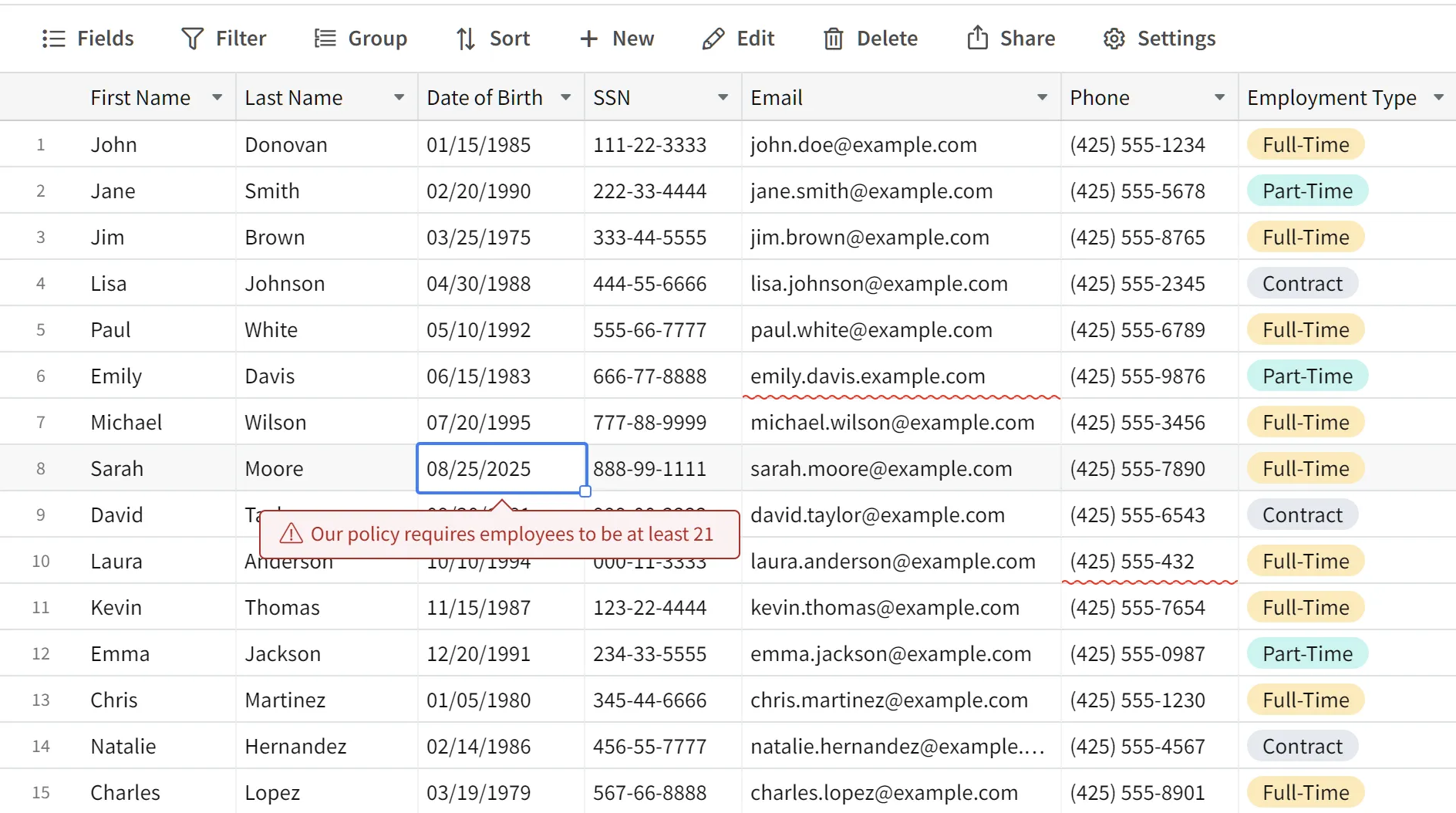
As shown above, Visual DB flags failing cells with a squiggly underline—click the cell to see the customizable error message.
NocoDB checks basic field types on save but doesn't give you custom validation rules with clear inline errors, letting bad data slip in unless you catch it yourself.
Review changes before committing
Why double-check your changes?
Validating updates before committing isn't just recommended—it's essential for data integrity and operational control. Once changes are committed, they may trigger automated workflows or downstream integrations almost instantly, and retroactive corrections can't undo the fallout.
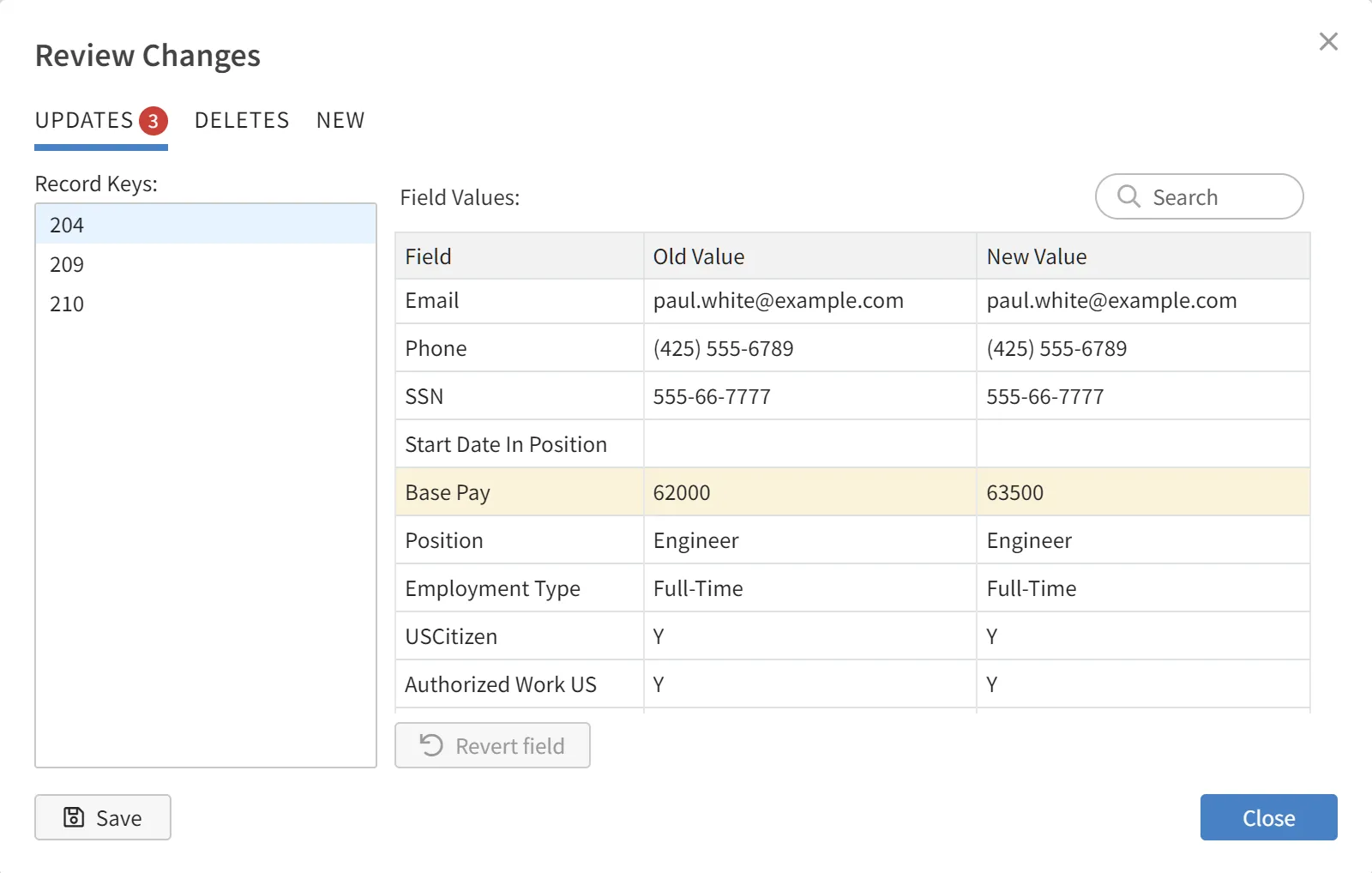
Visual DB lets you review and confirm all pending changes before they're finalized. You get full visibility into every modification, can revert incorrect updates caused by fat-fingering, and commit only when you're confident.
NocoDB, like most grid-based tools, applies changes directly to live data with no pre-commit review step—you find out about a mistake after it's already propagated.
More awesome grid features
Conditional coloring
Visual DB's conditional coloring lets you color individual fields within each record to spotlight exceptions—strong sales in green, low profitability in red, all in the same row.
NocoDB colors rows, not fields—so one bad number turns the whole record the same color as everything else in it.
Offline-viewable snapshots
Capture a moment-in-time snapshot of your data for sharing, archiving, or reference—preserved exactly as it appeared, without relying on a live query that could change later.
Snapshots export as self-contained HTML files that anyone can open in a browser, no Visual DB account or database access required. Share externally without exposing your live data.
Quickly locate records
Visual DB's as-you-type find instantly locates and highlights matching records across every field—no need to pick a column or hit Enter. Totals update live to reflect just the records that match your search text.
When users can't quickly find what they need, they give up, work around the system, or edit the wrong record. Fast search keeps your data clean.
Industry-leading forms
Why forms often work better than grids
For many scenarios, forms are a better fit than spreadsheet-like views.
- Focused editing: a support rep updating one ticket shouldn't see every other ticket at the same time.
- Complex relationships: one-to-many and many-to-many relationships map naturally to master-detail forms; grids flatten everything.
- Dynamic interfaces: forms support conditional logic that shows or hides fields based on user input.
- Better guidance: forms can guide users with explanations and tooltips a grid can't provide.
- Error prevention: single-record forms reduce the risk of editing the wrong row and give a natural checkpoint for confirmation.
Forms as a first-class feature
Visual DB offers fully functional forms with complete CRUD support—querying, creating, updating, and deleting records directly. Users can pull up specific records by entering identifiers like ID, last name, or product name, using parameterized queries. When multiple matches are found, navigation controls make it easy to browse and select the right record.
NocoDB forms are built for record creation. Updating or deleting an existing record through a form isn't a native workflow—you're back in the grid for that.
Form layout & design
Visual DB features a highly interactive form builder with advanced layout capabilities. Forms support multiple fields per row, fields can be resized, and smart layout guides appear dynamically while you arrange fields.
Master-detail forms
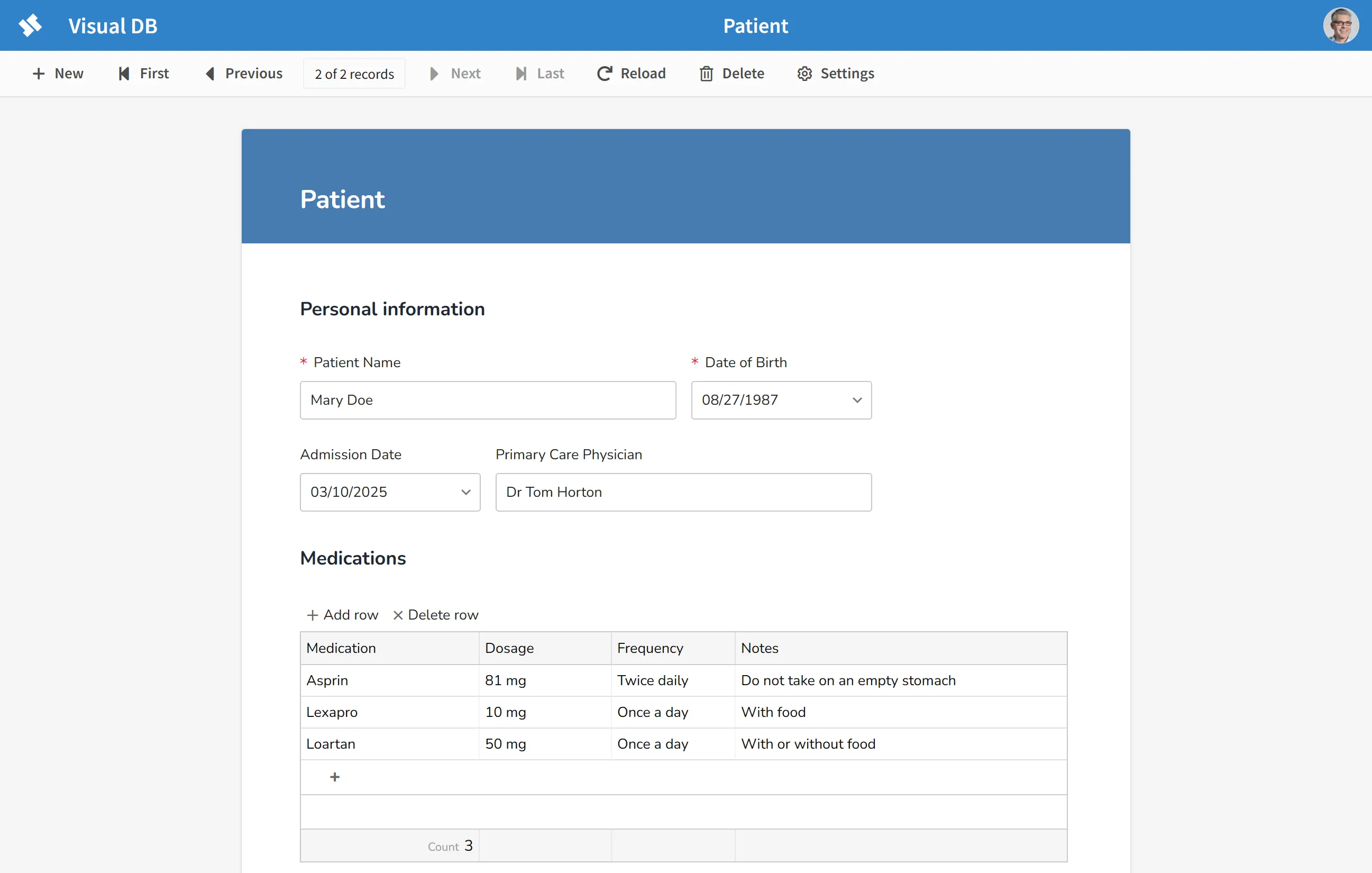
In scenarios like customers and their orders, projects and their tasks, or invoices and their line items, data is organized in one-to-many or many-to-many relationships. A master-detail form is the natural way to view and edit this kind of data: the "master" record on top, related "detail" records in a grid below.
Visual DB makes building master-detail forms simple, with no coding required, and commits master and detail rows as a single transaction—preventing situations like an order being saved without its order items.
NocoDB's linked records let you see related rows from an expanded record, but there's no single form that commits parent and child edits together as one transaction.
Built-in reporting
Query builder with AI assistance
Queries are the fundamental way to request specific data from a database. Visual DB's AI-assisted query builder lets anyone create real cross-table queries—joins included—through a visual interface. Describe what you want in plain English, and we translate it to SQL for you.
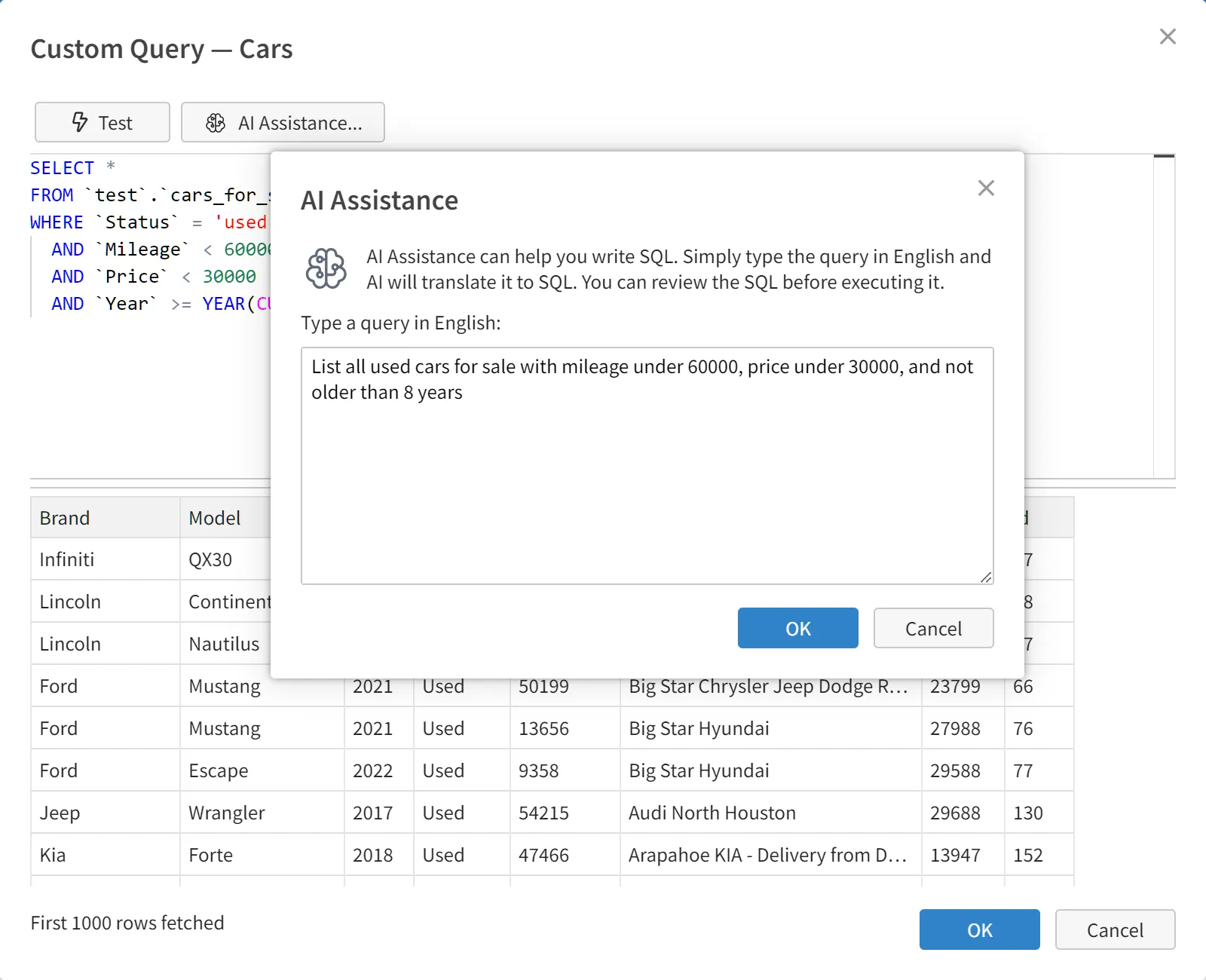
NocoDB's filters and its AI assistant, NocoAI, work within a single table or view. There's no query builder for pulling together data from multiple tables into one report—for real cross-table analysis, teams typically export NocoDB data into a separate BI tool.
Powerful parameter prompting
Parameter prompting lets a user hone in on exactly the data they need: a financial analyst filters by date range, a regional sales manager focuses on their territory, a marketing director isolates enterprise accounts from SMB.
Parameters are different from client-side filters—they're processed at report generation time, so the underlying query itself is modified before execution rather than trimming an already-retrieved dataset afterward. With tens of millions of rows, that distinction is the difference between a report that runs and one that doesn't.
Parameters can be multi-valued (California, Oregon, and Washington in one shot) and cascading, where the value picked in one dropdown determines the choices in the next.
Charts & dashboards
Visual DB has 15 different chart types for reporting and interactive data analysis, included on every plan—self-hosted or cloud.
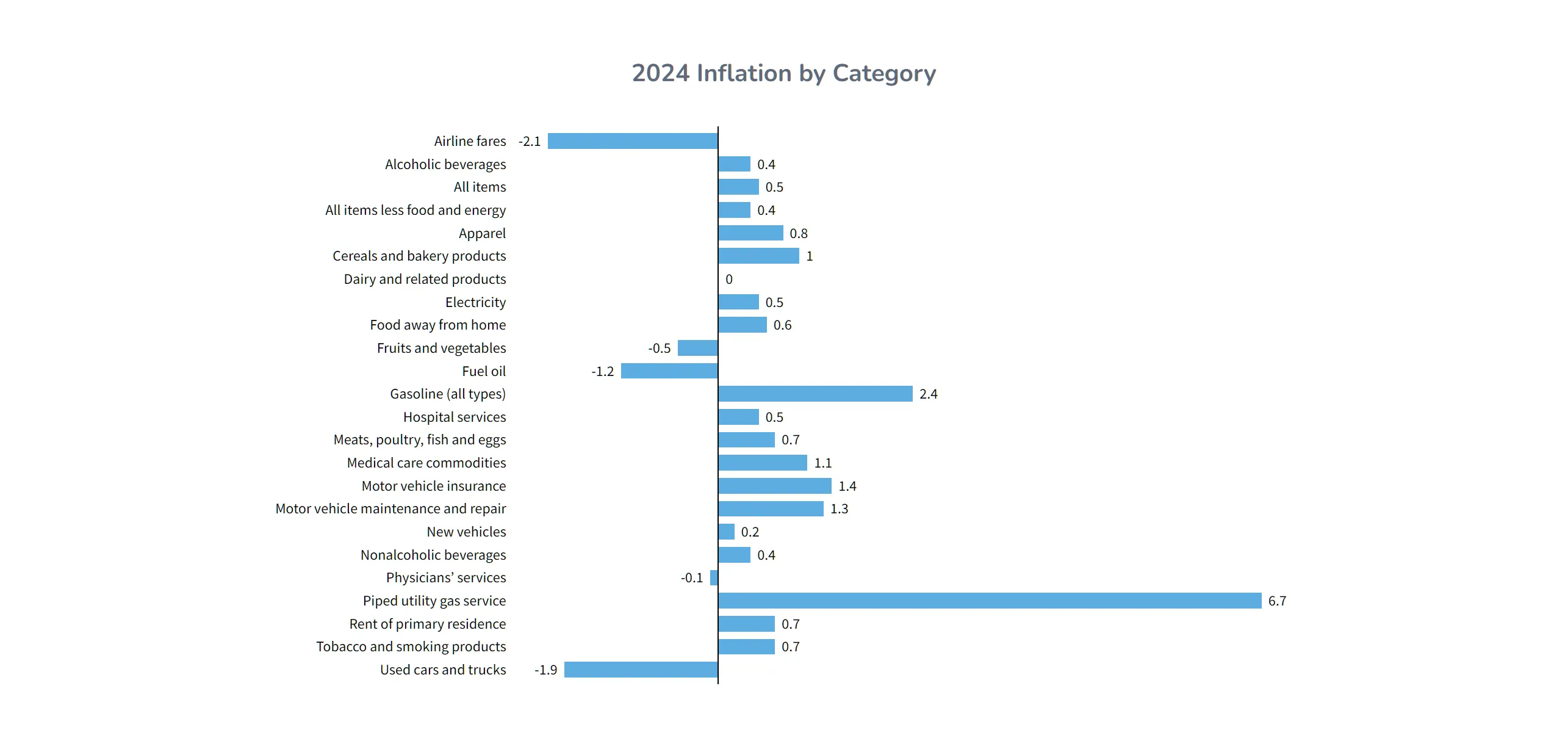
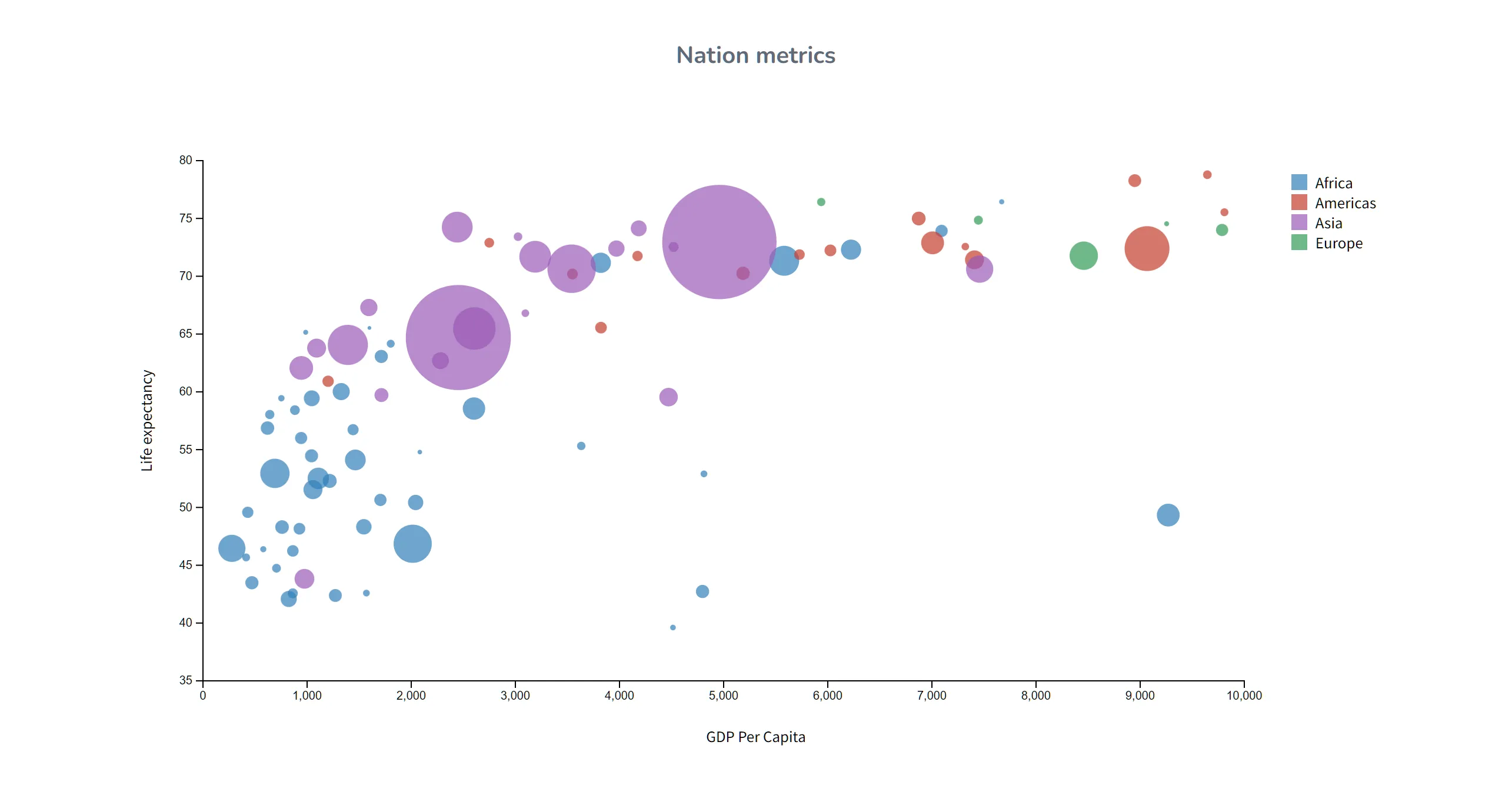
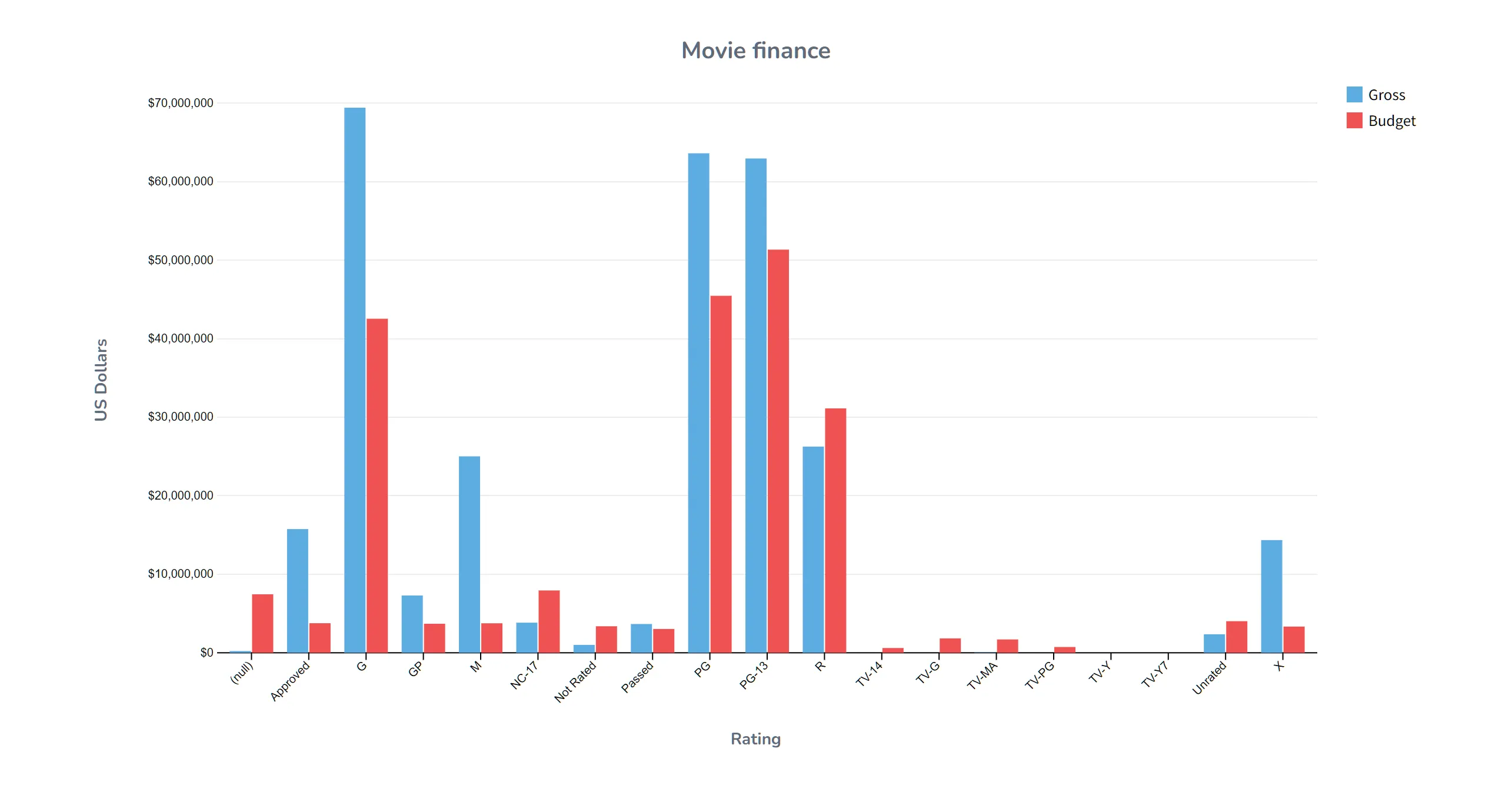
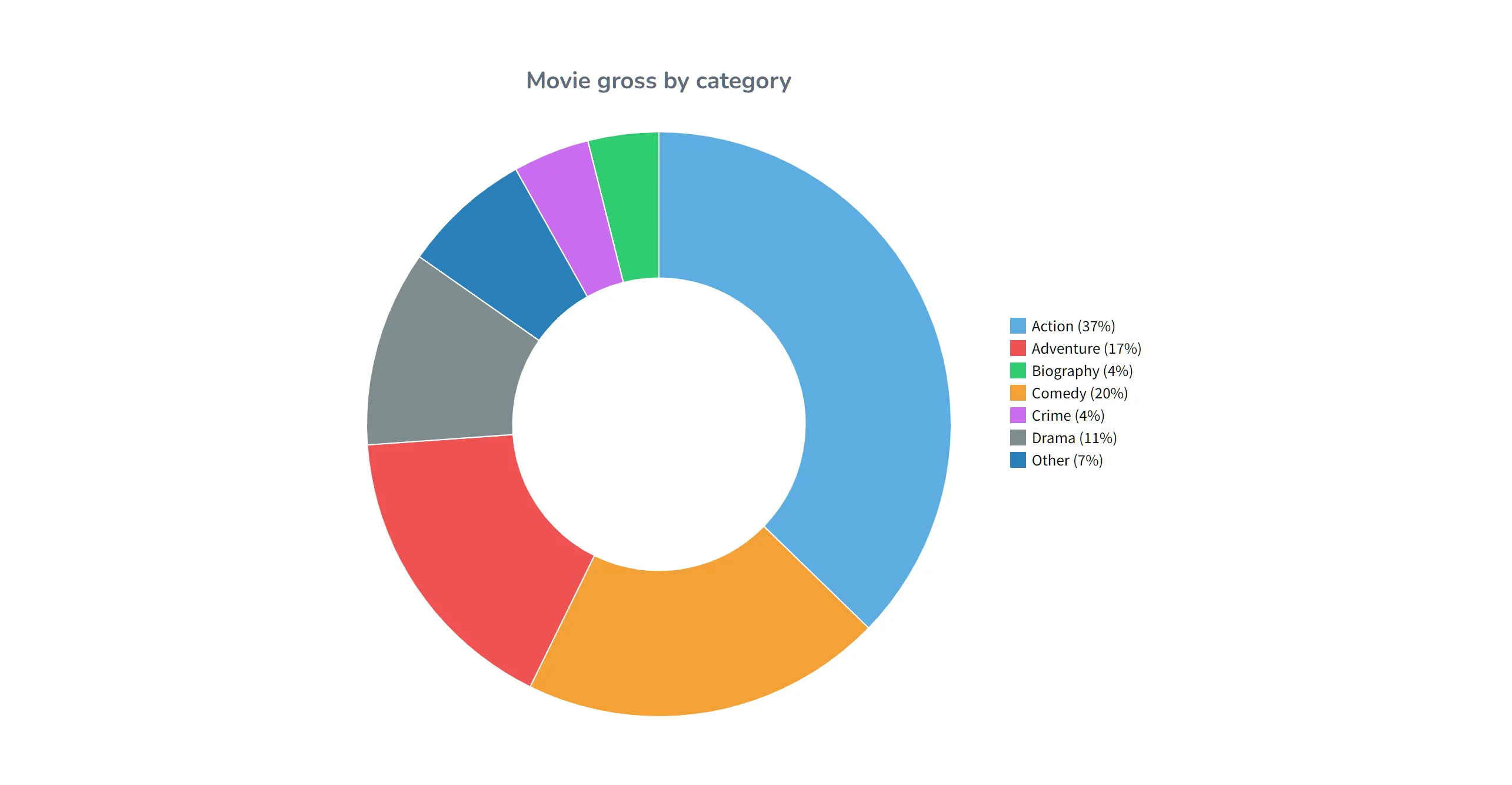
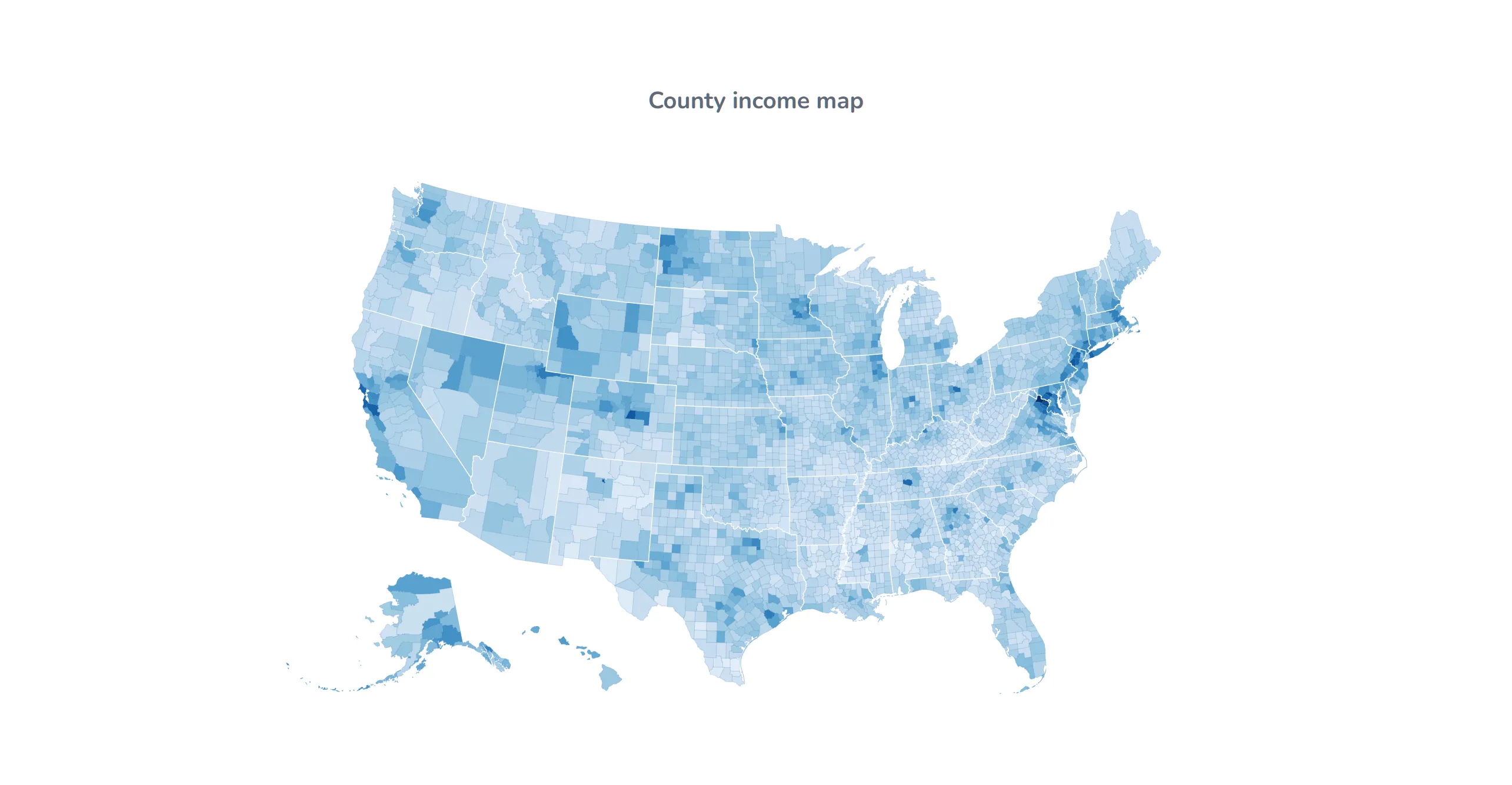
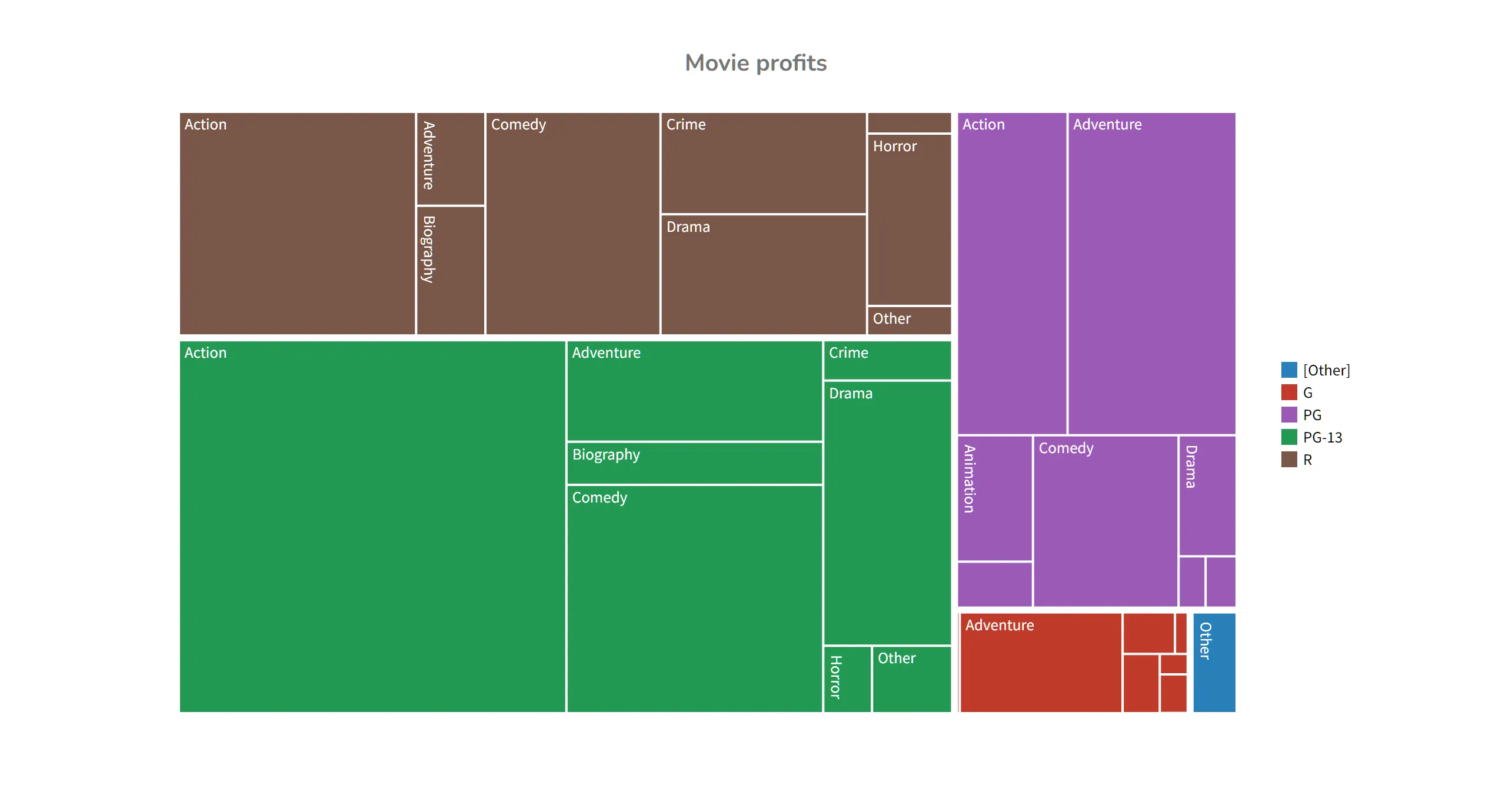
NocoDB's Dashboards feature is still in beta and only ships on the paid Plus and Business cloud tiers, with a handful of widget types (bar, line, pie, donut, number). No map, no treemap, no bubble chart, and nothing at all if you're self-hosting the free community edition.
Time-series analysis
Time-series analysis reveals patterns and trends that single-point measurements can't capture. Interactive time-series in Visual DB lets users zoom into specific periods and pan across date ranges.
NocoDB's line chart widget plots values over time, but there's no zoom or pan—what you configure is what you get.
Database
Take ownership of your database
Visual DB can provision a managed Postgres database for you at Neon.com (owned by Databricks) with a single click—and you can transfer that database instantly to your own Neon account. No migration, no downtime. Once transferred, you have full control and can connect it to any application—no vendor lock-in.
NocoDB Cloud stores your data in its own multi-tenant hosting. There's no one-click path to take that specific database instance and make it yours—you export and re-import elsewhere.
AI assistance for building SQL commands
Visual DB's AI can write and execute real, portable SQL statements against your schema directly—the same SQL you could hand to any other tool.
NocoDB's AI assistant helps you build filters, formulas, and field options inside NocoDB's own interface—useful, but it isn't writing SQL you can take with you.
Self-hosted shouldn't mean second-class
NocoDB is free to self-host, which sounds like a win—until you look at what the self-hosted community edition is actually missing. SSO is locked to the Enterprise edition. Private bases require Business plan or above. Dashboards are gated to paid cloud tiers. Self-hosting NocoDB for free gets you a meaningfully smaller product than the one on the pricing page.
Self-host Visual DB and you get the exact same product as our cloud customers—SSO included, every feature included, nothing held back for a higher tier. If it's on our pricing page, it's in the self-hosted build too.
No artificial ceilings
NocoDB's cloud plans cap what you can actually do: the Plus plan tops out at 50,000 records, 20 GB of storage, 10,000 webhook runs, and 100,000 API calls per month. Business raises that to 300,000 records and 100 GB—still a wall you'll eventually hit. And because NocoDB only bills your first nine editor seats, the price doesn't change whether you have 10 users or 100—but neither do the record and API caps. Grow past them, and Enterprise sales is the only door left.
Visual DB doesn't impose artificial caps on records, API calls, or webhook runs. Your database's own capacity is the only limit.
A license that can change under you
In early 2026, NocoDB quietly moved off AGPL-3.0 and onto a proprietary "Sustainable Use License"—source-available, not an OSI-approved open-source license, and it restricts running NocoDB as a hosted service for others. The project pulled "open source" language from its own repo and docs after the community called it out.
That's not a knock on the team for wanting a sustainable business—it's a reason to think twice before you build critical infrastructure on a license that can be rewritten out from under existing deployments with a single release. If open governance and license stability matter to your organization, that's worth weighing before you commit.
Conclusion
Free and self-hostable is a great starting point. It's not the same as full-featured, and it's not the same as open-source. Visual DB's data integrity guarantees—overwrite prevention, record-level consistency, conflict resolution, pre-commit review—plus a self-hosted edition with zero features held back, are unmatched by NocoDB.
When evaluating database front-ends, ask yourself:
- How important is it that users can't silently overwrite each other's changes?
- What happens to your data when two people edit the same record at once?
- How critical is the ability to review changes before committing them?
- If you self-host, are you getting the full product—or a stripped-down one?
- Will your record counts and API usage outgrow the plan you're on today?
- Is the license you're building on today the license you'll still have next year?
Your data is too valuable to trust to a tool that looks open, but keeps the parts that matter most behind a paywall, an Enterprise sales call, or a license that can change on you.
Ready to dive in?
Join thousands of teams already boosting their productivity with Visual DB